When multiplayer feels unfair The hidden system's that decide if you trust a match Lede, You slip...
The 3 Metrics That Matter More Than Download Speed
The match was in overtime. It was a ranked session of Call of Duty, the kind where your palms get sweaty and you stop blinking. Mike, a competitive console gamer from Toronto, had the angle. He saw the enemy flanker before the flanker saw him. He lined up the shot, pulled the trigger, and waited for the hit marker.
Nothing happened.
For a split second, the game world froze. Then, the screen stuttered, and Mike’s character suddenly “teleported” five feet to the left - directly into the enemy’s crosshairs. Game over. Defeat.
Mike stared at his monitor in disbelief. He immediately pulled up a speed test on his phone. The result? 500 Mbps download speed. “I don’t get it,” he said, frustration evident in his voice. “I pay for the fastest internet package available. Why am I still lagging?”
It is the most common misconception in modern gaming: the belief that “fast” internet equals “smooth” gaming. We have been trained by Internet Service Provider (ISP) commercials to believe that bandwidth is king - that if we just pay for more Megabits per second (Mbps), our problems will vanish.
But when you transition from local hardware to cloud gaming, download speed is a vanity metric. It tells you how fast you can pull a 50GB file from a server, but it tells you nothing about the responsiveness of a live, interactive stream. If you are looking to ditch the expensive hardware and move to the cloud, you need to stop obsessing over bandwidth and start auditing the “Hidden Three” metrics: Ping, Jitter, and Packet Loss.
Metric #1: Latency (Ping) – The “Distance Tax”
If bandwidth is the width of the highway, latency (or Ping) is the speed limit. Specifically, it is the time, measured in milliseconds (ms), that it takes for a packet of data to travel from your controller, to the cloud server, and back to your screen.
Think of it like ordering a pizza. You could have a delivery driver with a Ferrari (high bandwidth/speed), but if the pizza shop is three cities away (high latency), your pizza is still going to be cold by the time it arrives. In cloud gaming, “cold pizza” looks like input lag - that heavy, sluggish feeling where you move your mouse, and the cursor waits half a second before following.

According to global data from Ookla, Canadian internet speeds are among the fastest in the world for downloading files. However, latency is governed by physics, specifically geographic distance. Many cloud services route Canadian traffic to data centers in the US Northeast. That physical distance creates a “latency tax.”
How to Audit Your Ping:
Don’t rely on the default speed test your ISP provides, as it often pings the server closest to them, not the game server you actually use. Instead, use a localized ping test to the specific region where your cloud provider’s servers are located (e.g., Toronto or Montreal).
- Gold Standard: Under 15ms (Feels instant, like local hardware).
- Playable: 20ms - 40ms (Fine for RPGs, tough for shooters).
- The Danger Zone: Over 50ms (Noticeable delay).
Metric #2: Jitter - The Silent Killer
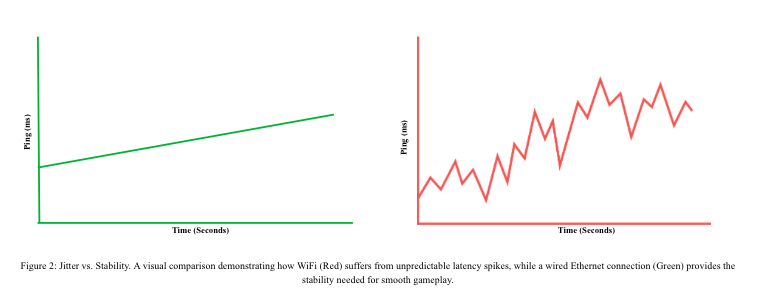
While consistent latency is manageable, (your brain can actually adapt to a steady 30ms delay) fluctuating latency is impossible to muscle memory your way through. This variance is called Jitter.
I recently spoke with Mike about his transition from WiFi to wired gaming. “The worst part wasn't the constant lag,” he explained. “It was the spikes. I’d be running fine at 20 ping, and then suddenly it would jump to 150 ping because my roommate started watching Netflix. You can’t predict it, and you can’t play around it.”
Jitter is often the result of signal interference. If you are gaming on WiFi, your data is competing with your neighbor’s router, your microwave, and the walls of your apartment.
The Fix: Embrace the Cable
The single most effective upgrade you can make for cloud gaming costs less than $20. Buy a Cat6 Ethernet cable and hardwire your device to your router. WiFi is convenient, but Ethernet provides the stability required to keep Jitter near zero. If you must use WiFi, ensure you are connected to the 5GHz band, which is faster and less crowded than the older 2.4GHz band.
Metric #3: Packet Loss – The “Teleporting” Glitch
Packet loss is exactly what it sounds like: data that is sent from the server but never arrives at your device. In a video stream like Netflix, the app buffers to hide this. In real-time cloud gaming, there is no time to buffer. If a packet is lost, the frame is lost.
This creates the “teleporting” visual that ruined Mike’s match. One moment you are running down a hallway, and the next frame the server “corrects” your position to where you should have been, jerking your character backward. Newzoo’s global cloud gaming report highlights that network instability (like packet loss) remains the number one barrier to entry for competitive gamers. Even a 1% packet loss rate can render a fast-paced shooter unplayable.
Checking Your Router Health:
Packet loss is often caused by old or overheating hardware. If you are experiencing “rubber-banding” despite a wired connection:
- Power Cycle: Reboot your router to clear its cache.
- Check for Throttling: Some ISPs throttle heavy traffic during peak hours (7:00 PM – 9:00 PM). Run a packet loss test specifically during these times to see if your line quality degrades.
The Cloud Readiness Checklist
Before you commit to a subscription or sell your gaming rig, run your connection through this audit.

Conclusion
Back in his apartment, Mike made one change. He didn’t upgrade his internet package or buy a new console. He simply ran a 50-foot Ethernet cable from the hallway router to his desk. The next night, in the same overtime scenario, he saw the flanker. He pulled the trigger. There was no stutter, no teleporting, and no ghost in the machine. Just a clean hit and a “Victory” banner across the screen.
Cloud gaming is the future of accessibility, breaking down the financial barriers to high-end play. But it requires a foundation of stable infrastructure. By ignoring the vanity metrics and focusing on the stability of your connection, you can ensure that when you finally take the shot, the only thing you have to blame for a miss is your aim.